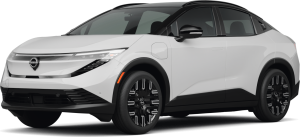
If the green light on your Nissan Ariya starts flashing, don’t panic. In most cases, it’s completely normal and tied to your vehicle’s charging process. But sometimes, that blinking signal can mean something more. Understanding what each pattern means is the first step in staying safe and informed. Whether your Ariya is charging, ready to charge, or fully powered up, the green and blue lights are there to guide you. When they behave unexpectedly, knowing how to tell normal from abnormal flashing can help you avoid confusion, wasted time, or even costly service visits.
This article breaks down the meaning behind each green light pattern, shows you how to tell if something’s wrong, and offers simple tips for what to do next. It also connects the light signals to your charging system, driving modes, and safety features so you can get the full picture. You’ll learn what steps to take if the green light flashes irregularly, when to call for service, and where to find official Nissan guidance.
A flashing green light on the Nissan Ariya is usually a simple sign of communication between your car and the charger. But if the pattern is off, Riverhead Nissan is here to help drivers in Riverhead, Calverton, and Northampton stay informed and in control. When your car speaks, it helps to know what it’s saying. Visit or contact Riverhead Nissan today for clear answers and trusted service. The flashing green light on the Nissan Ariya tells you about the vehicle’s charging status. It’s a normal part of the charging system, usually seen near the port or on the dash when a cable is connected.
What Does the Flashing Green Light on the Nissan Ariya Mean?
This light signals the following:
- The vehicle is preparing to charge or actively charging
- The system is working correctly
- Charging is happening at home or a public station
The Ariya uses light signals to simplify EV ownership. No need to check your app every time, the green light lets you know, at a glance, that your battery is powering up. If you’re new to EVs, seeing lights during charging may feel strange. But rest assured: the green light is a built-in communication tool, not a warning. It helps you track charging without extra steps. Just remember that if the light flashes and charging seems to be happening normally, it’s likely working just as it should.
How to Distinguish Between Normal and Abnormal Green Light Flashing
The green light flashing on your Ariya gives useful feedback. You just need to know what to look for. Some flash patterns are part of regular use, while others may need your attention.
Normal flashing patterns include:
- Flash every 1 second: Active charging
- Flash every 2 seconds: Ready to charge
- Solid blue: Charge complete
- Off after 5 minutes: Charger unplugged or idle
Abnormal patterns may include:
- Rapid green flashing with no charging action
- Flashing green and red at the same time
- Lights not matching any listed pattern
When flashing is abnormal, your best move is to check for a fault. Look at the dashboard for error signs. Review your charging setup for loose parts or debris. Most issues are minor and can be fixed fast. If you are unsure about a new light pattern, it is always smart to check the owner’s manual or speak to a trusted service advisor. Knowing what the Nissan Ariya green light flashing means helps keep your charge safe and your car running right.
What to Do If the Green Light Is Flashing Unexpectedly?
If the Ariya green light on the dashboard starts flashing out of the blue, begin by checking your charging setup. The flash may not mean danger, but it's smart to act.
Here’s what to do:
- Turn the car off, then back on. This can reset the system.
- See if the vehicle was just charging. The light may still be showing that state.
- Inspect the charger. Make sure the plug is tight and clean.
- Watch the flash pattern. Time the flashes to check if it fits a known state.
If the light still acts strangely:
- Try a different charging cable.
- Use a different outlet or station.
If none of these steps fix the problem, the Ariya may need a quick checkup. Contact your local Nissan expert for help. There are tools at the dealership to test the 12V system and charger health. These tools find issues that are not clear just from the dashboard. Owners do not have access to full system codes. This is why a check from a trained tech may be needed. It's best not to ignore a pattern that is new or unknown.
What Are Common Service Recommendations If It Flashes Persistently?
A green light that keeps flashing on the Nissan dashboard, even after charge is done, may need expert help. This can happen for a few reasons.
Some known causes are:
- The 12-volt battery is still charging from the main pack
- The charge system software may be slow to reset
If this happens often, a visit to your Nissan center is a smart move. They can check if the system needs a fix or a new update.
Steps a tech may take include:
- Battery check with shop tools
- Software scan for charge errors
- Reset of system timers
This light acts the same on all trims, from Engage to E-4ORCE. The fix steps are the same no matter what model you drive. If you want to avoid trips for this issue, check your charge habits. Always unplug fully, wait for the light to go off, and restart the car if needed. But when in doubt, a quick check at the dealer can give you peace of mind.
How Is the Green Light Connected to the Ariya’s Charging and Battery System?
The green light on the Nissan dashboard is part of the Ariya's charging setup. It tells you what is going on with the high-voltage battery. It also shows how the small 12-volt battery is managed. During charging, the high-voltage battery sends energy to the 12-volt system. This setup powers the lights, locks, and dash when the car is parked or off. The green light helps show the state of this full process.
Here is how the light works with charge types:
- Level 1 (standard outlet): Slow charge, steady green flash
- Level 2 (home or public): Faster charge, same flash speed
Stages of charge and light:
- Plug in: Light starts to flash
- Charging: Flashes once per second
- Almost full: May still flash
- Full: Turns blue, then goes off
The green light is a real-time sign. It helps you spot charge issues early. If it stops flashing too soon or acts odd, it could mean a fault. The Ariya is smart but still needs your eye now and then.
Does the Flashing Green Light Indicate Driving Mode or Vehicle Status?
The green light on your Ariya may seem linked to how the car drives, but it is not. This light only speaks for the charge system. It is not tied to driving modes or the gear lever.
Driving Modes That Use Other Alerts:
- Eco
- Sport
- e-Pedal
These modes appear on the dashboard screen, not through the green charge light. The green light has one job: to show charge activity or system readiness.
Functions Not Tied to the Green Light:
- Park or Drive gear
- Starting or ending a trip
- Battery level while driving
Other dashboard icons cover gear state, power use, or system health, and the green light does not give alerts for those. So, if you see the green light flashing, think charging, not driving. If unsure, check your dashboard screen for more detail.
Is the Flashing Green Light Related to Safety Features?
It’s easy to assume the flashing green light is tied to safety tools, but it is not. The green light on the Nissan Ariya only reflects charging activity, not system alerts. The Ariya includes many safety features. These use their own signals and alerts.
Safety Features With Their Own Alerts:
- Lane Keep Assist
- Emergency Brake
- Blind Spot Watch
- ProPILOT Assist
These systems rely on dashboard lights and sounds, typically in red or orange, and do not use the green charging light. If the green light flashes while driving, it may mean the charge setup wasn’t fully disconnected or turned off.
Quick Facts to Keep in Mind:
- Safety tools never use the green light
- Safety alerts will flash red or orange
- Check the screen or manual to be sure
If you're not sure, pull over. Check the dash for alerts. The green light on its own is not a cause to worry.
What does the flashing green light on my Nissan Ariya mean?
The flashing green light on your Nissan Ariya typically means the battery is charging or the system is preparing to charge.
Is a flashing green light on the Ariya a charging indicator?
Yes, a flashing green light is the Charging Status Indicator. It flashes during charging or when the vehicle is ready to charge.
Should I be concerned if the green light flashes while driving?
Yes, if the green light flashes while driving, this is not normal. It may signal a system issue, and you should contact a Nissan technician.
How can I turn off the flashing green light on my Ariya?
The green light turns off automatically about 5 minutes after unplugging or when the system completes its task. If it stays on, restart the EV system or check for charging faults.
Get Help with Your Nissan Ariya and More
If a green light flashes on your Nissan Ariya, we’re here to help explain what it means and what to do next. At Riverhead Nissan, we want to give you the confidence to enjoy every drive. Drivers in Riverhead, Calverton, and Northampton are invited to stop by and view our new Nissan vehicles. From electric models like the Ariya to trusted favorites like the Rogue, we have something for every need.
We also welcome you to keep learning about your car. If you are comparing trims, you can learn more about the Rogue S vs Platinum. If you want convenience features, check which Nissan models offer remote start. To protect your vehicle, it's helpful to know the optimal timing for oil changes. Explore more helpful guides across our site and contact Riverhead Nissan today.
Get Directions to Riverhead Nissan
Disclaimer: All information is provided for general informational and entertainment purposes only. While we strive for accuracy, we cannot guarantee that all content is complete, current, or error-free. Any reliance you place on such information is strictly at your own risk. This article may include opinions and is not endorsed by, or officially affiliated with, any vehicle manufacturer or brand. Always consult official sources – such as the vehicle’s owner’s manual, authorized dealerships, or certified professionals – for the most up-to-date and personalized information.